Building a high-performing Dialogflow agent, part I
In the chatbot world, two approaches clash, with a strong impact on user experience: NLU, or not?
NLU can create a unique conversational experience for users. Implemented badly, it can just as easily produce a truly disappointing one.
At Coddity we specialize in Google’s nocode chatbot platform, Dialogflow, and around it we’re going to walk you through two blog posts:
- How do you build and optimize an NLU implemented on Dialogflow? (the subject of this part I)
- How do you create a dataset for a fictional bot? (part II, coming up)
NLU?
NLU, for Natural Language Understanding, makes it possible to understand a user’s intent automatically from the sentences they type. This method is one branch of research in AI / data science.
A bot can be built without NLU. It then presents the user with a series of choices, to guide them and give them the answers they need: a sort of digital interactive voice server, minus the voice (although we may come back to voice bots in another article).
That design works very well for very specialized bots, or bots with little exposure. Add NLU detection, though, and you can turn a rather austere “click-the-button” experience into a real interactive conversation.
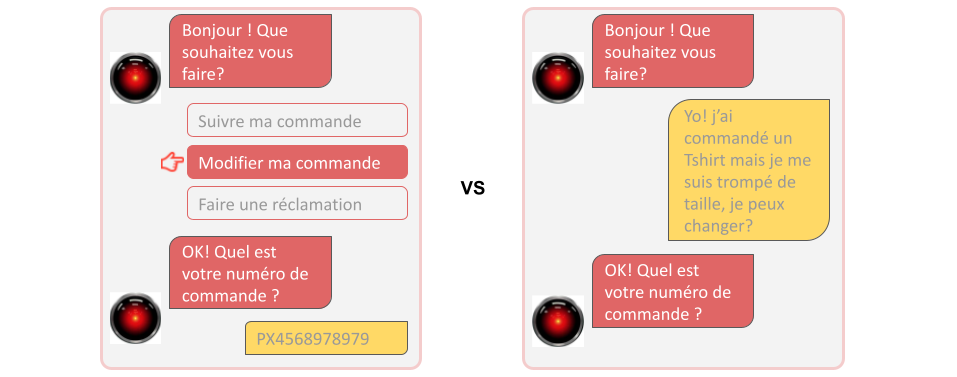
But careful!
NLU is not a magic tool that understands everything, natively, the moment you implement it. The performance and the quality of its detection depend above all on its design and its training. That’s what we’ll go through in the rest of this article, for the Dialogflow platform.
In this article, we’ll present the best practices to follow if you want to build a high-performing Dialogflow agent.
Dialogflow?
Dialogflow is Google’s NLU engine, and it lets you build chatbots from A to Z. Its modular interface is very complete and adapts to what you need: using only the NLU via APIs, building a complete bot with 0 lines of code, integration with messaging or a CRM, and so on.
The platform is very well integrated with Google Cloud Platform, which adds another layer of modularity and, on top of that, lets you use operational tools.
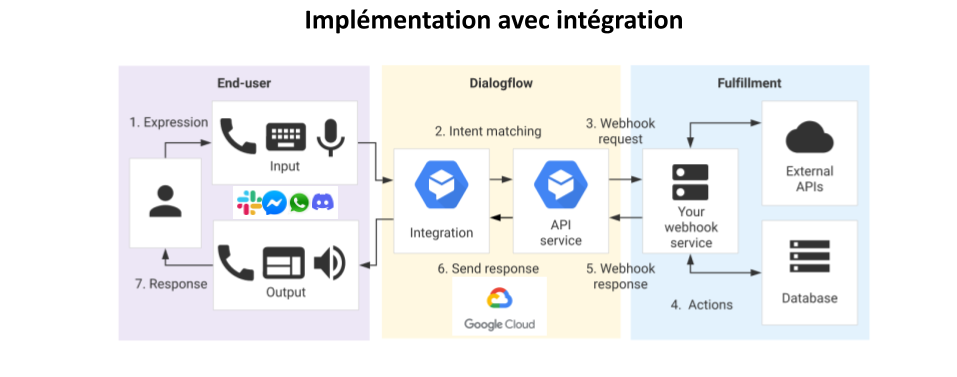
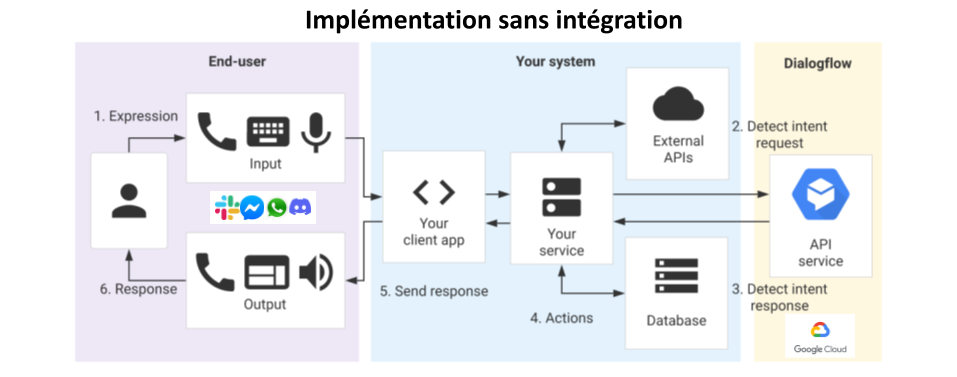
WARNING: this article is not meant to be a tutorial that lets you build a bot end to end. We’re going to focus on how to build high-performing intent detection on Dialogflow.
Dataset, intent detection, and entities
Simplifying a bit, NLU is a model that takes as input a sentence written in natural language and identifies its meaning, with a stronger or weaker probability.
In our chatbot case, the NLU takes a sentence typed by a user and identifies what we call an intent, that is, what the user wants.
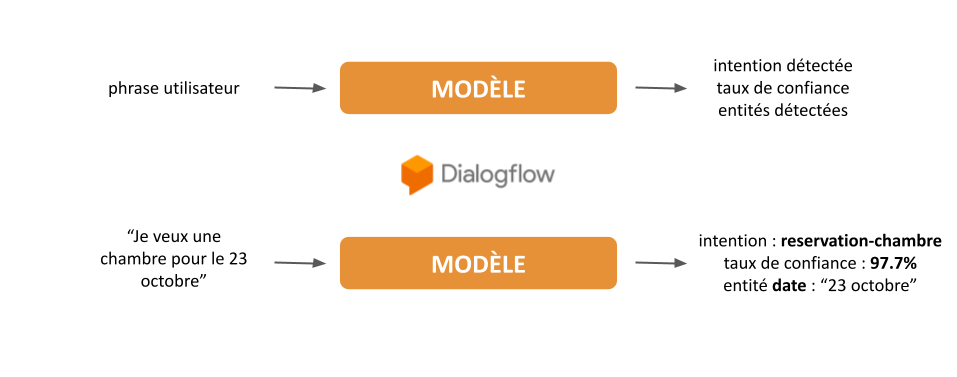
As you can imagine, an NLU / AI model that understood every human intent does not exist (at least not yet). These models are necessarily specialized, and built for a specific field of intents.
To create a specialized NLU model, you feed it a series of example sentences per intent. That’s what we call training. The full set of intents and their matching training sentences is called the dataset.
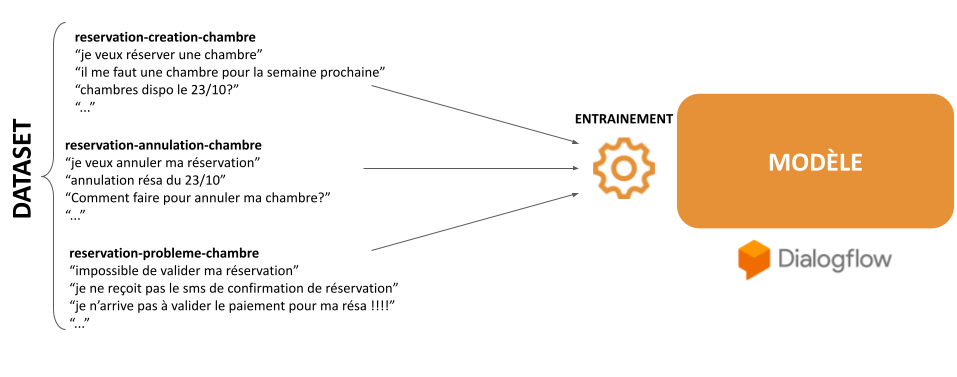
Besides intent detection, NLU models can extract entities from customer sentences. These are parameters tied to an intent, for example a date for a room booking, or a reference for tracking a case or an order.
Other features can be built into the model, sentiment analysis for example, which we’ll cover in another article.
The Dialogflow platform lets you create an NLU model, called an agent on the platform. Creating intents and entities is very easy, thanks to a clear, intuitive UI.
Designing a dataset
STEP 1: specialization
This step is essential. It means cutting the business scope into the intents our users will actually use. In other words, specializing our dataset.
What will your bot be able to do? What are your users going to ask it?
Segment the business scopes
The first thing to do is segment the business scopes, that is, the bot’s fields of action, for example:
- account administration actions
- order management actions
- delivery management actions
- appointment management actions
Identify user intents
You then have to identify users’ potential intents, and specialize them as much as possible. Take the delivery management business scope as an example. We can identify the intents below:
- get the status of your delivery
- change a delivery address
- report a problem with the quality of the delivery
- report a problem with the completeness of the delivery
Be careful not to group several things the user wants into a single intent! For example, don’t create an order management intent that contains creating, modifying, and cancelling an order. Those are three different wants.
Identify the entities
Entities let us capture information from user sentences. They are specific to certain intents, but several intents can use them.
Imagine, for example, that you have a “spécialité-medicale” entity. It could be used to characterize:
- booking an appointment with a doctor (“je veux un rendez avec un pneumologue”), with an intent “rdv-creation”
- a request for information about a medical specialty (“A quoi sert un pneumologue”), with an intent “specialites-info”
Dialogflow offers a number of automatic entities (such as picking up dates, addresses, or phone numbers) and “custom” entities specific to the dataset you create: an order or invoice number, the name of a business service or of an option, and so on.
Beyond using the values the entities return later, inside your scenarios, those entities help the model identify intents and contribute to better detection. For example, the model will identify:
- “rdv-creation” more easily with a “ville” or “date” entity (“je veux un rendez-vous en octobre à Paris avec un pneumologue”)
- than a request for information about a personal account, via an “admin-info-compte” intent, which in principle should not contain a date
Naming rules
Remember to name your intents properly, following a pattern that makes the meaning easy to grasp. We use this one, for example: perimetre_metier-action-domaine, as in: administration-info-compte or commande-obtenir-numero.
STEP 2: homogeneity
In data science there is an obvious rule, and it is worth understanding it properly: the data used to train the model must be homogeneous with the production data. In our case, the intents’ training sentences must be close to the sentences of the bot’s users.
Starting from that principle, creating the dataset can be a problem. Do we have user sentences? If so, do we have enough data, and data of good quality?
If your bot complements a chat channel (a customer service team, for example), the users’ first sentences when the chat starts are a good place to begin building your dataset. You will then have to annotate those sentences, that is, associate them with the intents you identified.
If you don’t have that kind of data, though, you are going to have to create and imagine, for each intent, user sentences. That can be a problem if we stick to a very “business” vocabulary: our users neither know, nor certainly use, OUR technical language (acronyms specific to an organization, and so on).
At Coddity, we sometimes use algorithms that automatically create variations of a sentence from one and the same sentence, which lets us build a starter dataset quickly.
Writing styles and spelling
At this stage a new constraint shows up: there are strong differences in syntax and spelling between the training sentences and real users’ sentences.
Your users make mistakes, and far more of them than you could imagine! Your dataset has to take that into account, otherwise you risk a model trained on data that is far from production.
Note that Dialogflow lets you add spelling correction on the way in, for the sentences the user sends. Even though it can fix errors, it isn’t perfect, and it can let some through. This corrector is a very good safety net, but it must not be your only strategy for spelling variation.
On that subject, at Coddity we ran an experiment on a dataset we had fully corrected by hand. Our performance measure (recall), with the spelling corrector turned on, showed a loss of 3 points compared with the model trained on the original dataset.
Your model therefore has to take into account, natively, the fact that your users make mistakes, by including different styles and forms of expression in its training dataset. Its goal is to understand the user, even if that means ignoring rules of the language that are sometimes elementary (and after all, isn’t that the whole idea of communication?).
STEP 3: the life of the bot
Now that you have a high-performing dataset, you can let it live its life and stop worrying about it… Obviously, that’s a #hashtag joke.
Watching your model in production will teach you a lot of things:
- it will let you measure your model’s performance (we’ll come back to that in a future article)
- the sentences your users actually use will help you retrain your model, correcting the “business” bias described in step 2
- you will see intents appear that you had absolutely not planned for in the initial business breakdown you did in step 1
That last point lets you bring real value to your users, and even spot anomalies in your processes!
Versioning
Dialogflow has a versioning system that lets you create different versions of your agent, deployable on custom environments. So if you want, you can change how your intents are split, deploy that on a different environment, and run A/B testing on different sources!

What’s next
You now have the methodology for creating a high-performing dataset! In a future article we’ll apply what we covered above, and build the dataset for leobot, a municipal bot.